Posts

Showing posts with the label Hong Kong connection

DBC (Hong Kong) live streams

DBC1 (數碼大聲台) rtmp://58.64.197.165/live/dbc1 DBC2 (數碼大家台) rtmp://58.64.197.165/live/dbc2 DBC3 (數碼大錢台) rtmp://58.64.197.165/live/dbc3 DBC4 (數碼大晒台) rtmp://58.64.197.165/live/dbc4 DBC5 (Digital We) rtmp://58.64.197.165/live/dbc5 DBC6 (數碼大歌台) rtmp://58.64.197.165/live/dbc6 DBC7 (數碼大戲台) rtmp://58.64.197.165/live/dbc7 The location of these streams can be found by in the source code of the current DBC website .

Calibre recipe for Ming Pao (明報)

Check here RSS feed for Ming Pao: Headlines: http://news.mingpao.com/RSS/webnews/ga.xml Local: http://news.mingpao.com/RSS/webnews/gb.xml Education: http://news.mingpao.com/RSS/webnews/gf.xml Editorial: http://news.mingpao.com/RSS/webnews/mr.xml Forum: http://news.mingpao.com/RSS/webnews/fa.xml China: http://news.mingpao.com/RSS/webnews/ca.xml World: http://news.mingpao.com/RSS/webnews/ta.xml Finance: http://news.mingpao.com/RSS/webnews/ea.xml Sports: http://news.mingpao.com/RSS/webnews/sp.xml Film/TV: http://news.mingpao.com/RSS/webnews/ma.xml Supplement: http://news.mingpao.com/RSS/webnews/ja.xml English: http://news.mingpao.com/RSS/webnews/em.xml

RTHK Octoshape Streams

NOTE: As at Aug 2015, the octoshape streams of RTHK have been shut down. Please visit  here for the replacement m3u8 streams instead. You need to specify the stream locators if you run the octoshape client separately. (For example, if you run Linux, you can't invoking the program from the RTHK live broadcast pop-up window in the corporate's web main page. You can only type in command line > ./OctoshapeClient - url: [stream_locators] Replace [stream_locators] with the media you want: RTHK Radio 1: rthk.ch1 RTHK Radio 2: rthk.ch2 RTHK Radio 3: rthk.ch3 RTHK Radio 4: rthk.ch4 RTHK Radio 5: rthk.ch5 RTHK PTH: rthk.ch6 RTHK Live TV: rthk.livetv RTHK DAB31: rthk.ch31 RTHK DAB33: rthk.ch33 RTHK DAB35: rthk.ch35 Remark on Mar 25, 2010: In Linux, if you start the octoshape client by the command line > ./OctoshapeClient Then webpages which has octoshape stream available in Flash (e.g. The RTHK Radio Live Player ) will be played properly. P.S. RTHK TV str...

Fix "My RTHK Radio Player" Windows Gadget

Image
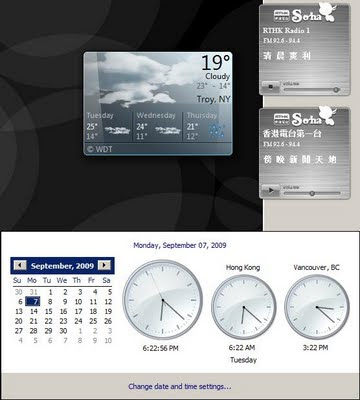
Although looking elegant, the My RTHK radio player available in the official site (at least the Windows gadget version) suffers from two critical problems on displaying the schedule. If you are in a time zone different from HKT (GMT +8), the on-air program shown in minimized mode is based on the program schedule of the day and your local time . Suppose you are in the US. At the time you are in your morning while Hong Kong is at night, the live stream plays the night show, but the on-air program shown is some morning show. The gadget retrieves program schedules which is updated every midnight. However, each schedule covers time from 6.00am - 5.59am the next day. This means when you are at time from 0.00am - 5.59am, the schedules you have are for the next day. Fix: Download the gadget file. Unzip it. (Renaming the extension to .zip may help.) Open script/common.js as a text file (with Notepad, for example). Look for the line var currentH = current.getHours(); (which is in the de...