Posts

Showing posts with the label VLC player

Hong Kong media HD stream direct links

You can use VLC player to play these links directly. RTHK Radio 1:  http://rthkaudio1-lh.akamaihd.net/i/radio1_1@355864/master.m3u8 Radio 2:  http://rthkaudio2-lh.akamaihd.net/i/radio2_1@355865/master.m3u8 Radio 3:  http://rthkaudio3-lh.akamaihd.net/i/radio3_1@355866/master.m3u8 Radio 4:  http://rthkaudio4-lh.akamaihd.net/i/radio4_1@355867/master.m3u8 Radio 5:  http://rthkaudio5-lh.akamaihd.net/i/radio5_1@355868/master.m3u8 Radio PTH:  http://rthkaudio6-lh.akamaihd.net/i/radiopth_1@355869/master.m3u8 DAB 31:  http://rthkaudio7-lh.akamaihd.net/i/dab31_1@355870/master.m3u8 DAB 32:  http://rthkaudio8-lh.akamaihd.net/i/dab33_1@355871/master.m3u8 DAB 35:  http://rthkaudio9-lh.akamaihd.net/i/dab35_1@355872/master.m3u8 TV31:  http://rthklive1-lh.akamaihd.net/i/rthk31_1@167495/index_2052_av-b.m3u8 TV32:  http://rthklive2-lh.akamaihd.net/i/rthk32_1@168450/index_2052_av-b.m3u8 References https://sites.google.com/site/mobe...
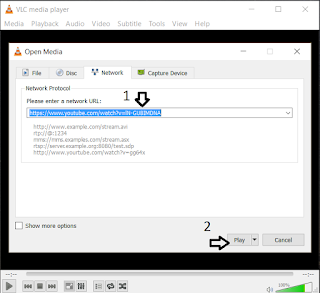
Download Youtube videos using ad-free open source VLC media player

Image
Here I record an ad-free, open source solution to downloading youtube videos using VLC media player. The player is available in virtually all common operating systems such as Windows, Mac and Linux and can be downloaded here . Step 1: Use your web browser to locate on the youtube website the video that you want to download. Copy the link. For example: https://www.youtube.com/watch?v=lN-GUBIMDNA Step 2: Start VLC player. From the main menu, select "Media" -> "Open network stream". Paste the link in step 1 to the textbox and click on the Play button. Step 3: From the main menu, select Tools -> Codec information. Step 4: In the subsequent window, copy the text inside the location field. That is the link to the video file. Step 5: Paste the link to your web browser. Right click on the video and then select "Save Video As"/"Save As" to save the video file. Reference NOTE: There is an even simpler way to download youtub...