Posts

Showing posts with the label octoshape

Octoshape under environment with network proxy

In an environment with network proxy, you have to manually specify the global http and https proxy setting of the system for octoshape to work properly. In Ubuntu, you can find it in All Settings -> Network. Under proxy, manually set the HTTP and HTTPS proxy and click on "Apply system wide".

Config octoshape to start up on boot

[Optional] Move the octoshape executable downloaded from the octoshape official site to some global location, like /opt/octoshape. Give good permission to typical users for the file there. Write a script named FOO, for example, in /etc/init.d/ directory. (/opt/octoshape/OctoshapeClient). And then run (chmod +x FOO) and then (update-rc.d FOO defaults)

Record octoshape stream with VLC Player

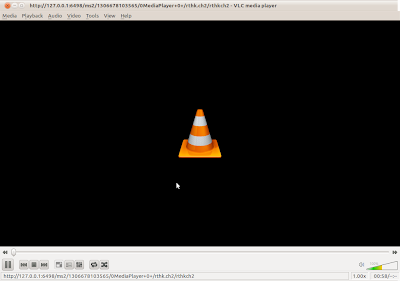
Image
To use VLC player to record an octoshape stream, first you need to figure out the HTTP location of the octoshape stream when it is played in your local computer. To find that out, play the octoshape stream with VLC player. You can check how to do that in Windows here . In Linux, one can do that according to the instruction here , with an additional simple config . For example, when I use the stream rthk.ch2 ., the corresponding HTTP location is shown as the window title. If you choose to record using VLC Player interface, then from the main menu, select "Media" -> "Convert/Save". Under the "Network" tab, enter the network URL in the only text field, and click on the "Convert/Save" button below. In the subsequent window, fill in the destination file name. Click "Start" to start recording. [Updated 2014/07/12] NOTE : The file has to be named with .mp4 as extenstion instead of .mp3 shown in the screenshot below. (i.e. /home/te...
Play octoshape stream on windows with VLC player

Install windows octoshape plugin at http://www.octoshape.com/files/octosetup.exe Install VLC player at http://www.videolan.org/vlc/download-windows.html . Use the installer so later octoshape can pick it as the preferred player. (Updated 12/26/2010: A dirty way to make sure windows associate all media files to vlc player is to explicitly set in vlc's Tool -> Preferences -> Interface -> Set up associations, select all file types. Then in Octoshape Settings (right click on the Octoshape system tray icon and select Settings), select use "System player") Create a bat file named stream.bat. In Windows XP, type in the bat file. "C:\Documents and Settings\ [user]\Application Data\Octoshape\Octoshape Streaming Services\OctoshapeClient.exe" -url:[octostream] In Windows Vista/7 "C:\Users\[user] \AppData\Roaming\Octoshape\Octoshape Streaming Services\OctoshapeClient.exe" -url:[octostream] Replace [user] with your current user name, [octostream] w...

RTHK Octoshape Streams

NOTE: As at Aug 2015, the octoshape streams of RTHK have been shut down. Please visit  here for the replacement m3u8 streams instead. You need to specify the stream locators if you run the octoshape client separately. (For example, if you run Linux, you can't invoking the program from the RTHK live broadcast pop-up window in the corporate's web main page. You can only type in command line > ./OctoshapeClient - url: [stream_locators] Replace [stream_locators] with the media you want: RTHK Radio 1: rthk.ch1 RTHK Radio 2: rthk.ch2 RTHK Radio 3: rthk.ch3 RTHK Radio 4: rthk.ch4 RTHK Radio 5: rthk.ch5 RTHK PTH: rthk.ch6 RTHK Live TV: rthk.livetv RTHK DAB31: rthk.ch31 RTHK DAB33: rthk.ch33 RTHK DAB35: rthk.ch35 Remark on Mar 25, 2010: In Linux, if you start the octoshape client by the command line > ./OctoshapeClient Then webpages which has octoshape stream available in Flash (e.g. The RTHK Radio Live Player ) will be played properly. P.S. RTHK TV str...