Posts

Remove ads from Windows Live Messenger

Get annoyed with the ads in the official Windows Live Messenger, but don't want to switch to other IM clients? Here are some simple steps you can take to minimize the disturbance. They do not require use of any other external programs. Open Internet Explorer. From the main menu, select Tools -> Internet Options . Under the Security tab, click on the Internet icon. Set the security level of the zone to be High . This blocks advertisements from showing in the Windows Live Messenger main window. Click on the Restricted Site icon. Press the Sites button. Add http://rad.msn.com . Open \Windows\Systems32\drivers\etc\hosts.ics . Add the following line at the end of the file. 127.0.0.1 rad.msn.com (If it happens you cannot save your change, try this .) Then your message window will be free of text advertisement. Reference: here
Fix "My RTHK Radio Player" Windows Gadget

Image
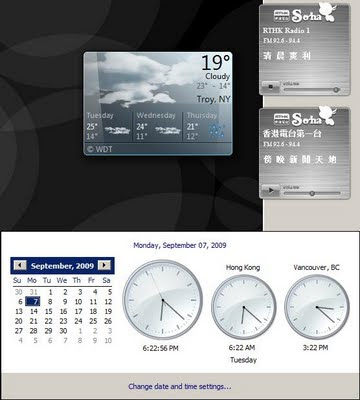
Although looking elegant, the My RTHK radio player available in the official site (at least the Windows gadget version) suffers from two critical problems on displaying the schedule. If you are in a time zone different from HKT (GMT +8), the on-air program shown in minimized mode is based on the program schedule of the day and your local time . Suppose you are in the US. At the time you are in your morning while Hong Kong is at night, the live stream plays the night show, but the on-air program shown is some morning show. The gadget retrieves program schedules which is updated every midnight. However, each schedule covers time from 6.00am - 5.59am the next day. This means when you are at time from 0.00am - 5.59am, the schedules you have are for the next day. Fix: Download the gadget file. Unzip it. (Renaming the extension to .zip may help.) Open script/common.js as a text file (with Notepad, for example). Look for the line var currentH = current.getHours(); (which is in the de...

Play DOS PC Games with CD audio through images

Check where the CD is located in the Linux system > cdrdao scanbus Suppose you get the following which says it is at /dev/sr0 Cdrdao version 1.2.3 - (C) Andreas Mueller /dev/sr0 : Slimtype, DVDRW SOSW-833S , VRS3 Make sure that location is unmounted. > umount /dev/sr0 Create the bin image of the CD and the corresponding cue file via > cdrdao read-cd --datafile image.bin --driver generic-mmc:0x20000 --device /dev/sr0 --read-raw image.toc > toc2cue image.toc image.cue Install DosBox Start DosBox Mount the c drive to some directory in the local machine, for example > mount c /home/tylau/Documents/dos Mount the d drive to the cue file, for example > imgmount d /home/tylau/Desktop/ssf2t.cue -t iso -fs iso Follow instruction to install or start the game. Command to burn the bin/cue back to a CD. cdrdao write --device /dev/sr0 --swap ssf2t.toc   To convert bin/cue to iso/wav bchunk IMAGE.bin IMAGE.cue IMAGE.iso  -w Ref Ref2  

Two ways to connect to VNC server with computer of low resolution

Method 1: On vncserver startup, specify geometry and dpi. Example: vncserver -geometry 980x680 -dpi 80 Method 2: Use ultraVNC which is available free. In option, under the "Scale" section, select a value smaller than 100.

Bottom part of the windows cannot get displayed in Ubuntu netbook

Even after my effort to maximize space for window display, I just find that sometimes the bottom part of the windows, where the confirm and cancel buttons are resided, are hindered from display due to reduced vertical resolution in netbook. After surfing the Internet, I get the following temporary solution: When the mouse is over the window, hold the "Alt" button and drag the windows. Then you can move the window top beyond the top of the screen, and the bottom part can then show up. Source: http://www.linuxforums.org/forum/linux-laptops-netbooks-minibooks/83948-screen-resolution-default-window-resize.html

Customizing Ubuntu for netbook

The default theme used in Ubuntu does not fit well with the rather limited resolution of a netbook. With its 1024x600 resolution, sometimes the bottom part of the window simply cannot show up. No slidebar is available for me, therefore there is no way for me to move down to press the essential confirm button there. So I am investigating ways to get things improved. Below are what I do today. Go to System -> Preferences -> Appearance. Under the Fonts tab, click the Details button. Set the resolution to be 84 dots per inch (dpi). This is by far the smallest dpi setting that still makes the font look pleasant. Under the Theme tab, select Glider. The windows under this theme is by so far I know using minimum height to display title bar and menu bar. This helps to save a little vertical space. You may as well click on the Customize button to work on minor modification of the theme. Right click on the top panel, select "Properties". Under the General tab, lower the size to be...