Posts

Can't switch input method of gcin in Ubuntu 9.10

If you would like to use cangjie (倉頡) input method but often don't know the full input codes for words, probably you will find gcin the best Chinese input method for Linux Desktop. First it supports * wildcards as in the counterpart in Microsoft Windows. Second it allows words so typed to turn to simplified Chinese automatically. However, in Ubuntu 9.10, the installed gcin may not allow you to switch between input methods. The solution that works with me is as follows: Remember to type sudo im-switch -s gcin so gcin starts when boot. Open the corresponding config file. One can do it in command prompt, by typing in sudo pico /usr/lib/gtk-2.0/2.10.0/immodule-files.d/gcin.immodules Change the line "gcin" "gcin Input Method" "gcin" "/usr/share/locale" "*" to "gcin" "gcin Input Method" "gcin" "/usr/share/locale" "" Reboot the machine More information about the problem and the solution c...

Even better gnome customization for netbook

Image
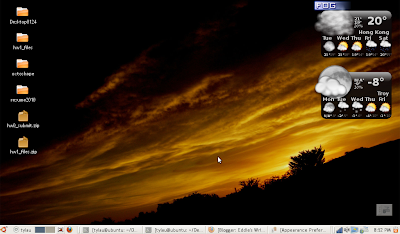
Use Gnome Color Chooser . There you can Reduce the size of the icons in the application menu. So the menu space can fit in more applications. Change the font color of Desktop icon, so as to fit the color pattern of the background (for example, you may wish a black instead of the default white Desktop icon font to fit a white background).

Finally fitting gnome deskop on netbook small screen

Image
Finally I get a nice Gnome layout on my netbook of resolution 1024 x 600 by the use of Trebuchet MS font (require sudo apt-get install msttcorefonts ) size 9 extensively in System -> Preferences -> Appearance -> Fonts (this one still looks nicely even when it is as small as size 9). removing the default panel on the top (by right-clicking on the empty space of the top panel and selecting the appropriate option), putting icons and shortening the date/time display (also by right-clicking on the empty space of the panel to add back, move and customize elements) P.S. To get even better Tahoma fonts used in Microsoft Windows Standard Theme ( ref ), one can do the following: Install Wine In command prompt, type mkdir ~/.fonts Copy the fonts to user .fonts directory: cp /usr/share/wine/fonts/tahoma* ~/.fonts Change the font size to 8

Set SSH to run on windows on boot time

To install SSH for windows, this should have given you plenty of instructions to follow. But at some step when you wish to start sshd demon again, it returns the following error: The CYGWIN sshd service could not be started. The service did not report an error. In that case, run the following command in Cygwin shell. > sudo chown system:system /var/empty > chown system:system /etc/ssh_h* This should solve the problem. (Reference: here ) To further set it as a service (i.e. the ssh server is started once you switch on the computer), you can follow the instructions here , in additional to this . In summary, the steps are 1. Download and install the Windows Server 2003 Resource Kit Tools from Microsoft. 2. In cmd , type > "C:\Program Files\Windows Resource Kits\Tools\instsrv.exe" OpenSSHD "C:\Program Files\Windows Resource Kits\Tools\srvany.exe" 3. Run Registry Editor ( Regedt32.exe ) and locate the following subkey: HKEY_LOCAL_MACHINE\SYSTEM\CurrentContr...

Remove ads from Windows Live Messenger

Get annoyed with the ads in the official Windows Live Messenger, but don't want to switch to other IM clients? Here are some simple steps you can take to minimize the disturbance. They do not require use of any other external programs. Open Internet Explorer. From the main menu, select Tools -> Internet Options . Under the Security tab, click on the Internet icon. Set the security level of the zone to be High . This blocks advertisements from showing in the Windows Live Messenger main window. Click on the Restricted Site icon. Press the Sites button. Add http://rad.msn.com . Open \Windows\Systems32\drivers\etc\hosts.ics . Add the following line at the end of the file. 127.0.0.1 rad.msn.com (If it happens you cannot save your change, try this .) Then your message window will be free of text advertisement. Reference: here

Fix "My RTHK Radio Player" Windows Gadget

Image
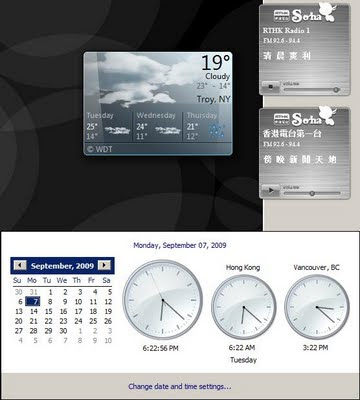
Although looking elegant, the My RTHK radio player available in the official site (at least the Windows gadget version) suffers from two critical problems on displaying the schedule. If you are in a time zone different from HKT (GMT +8), the on-air program shown in minimized mode is based on the program schedule of the day and your local time . Suppose you are in the US. At the time you are in your morning while Hong Kong is at night, the live stream plays the night show, but the on-air program shown is some morning show. The gadget retrieves program schedules which is updated every midnight. However, each schedule covers time from 6.00am - 5.59am the next day. This means when you are at time from 0.00am - 5.59am, the schedules you have are for the next day. Fix: Download the gadget file. Unzip it. (Renaming the extension to .zip may help.) Open script/common.js as a text file (with Notepad, for example). Look for the line var currentH = current.getHours(); (which is in the de...

Play DOS PC Games with CD audio through images

Check where the CD is located in the Linux system > cdrdao scanbus Suppose you get the following which says it is at /dev/sr0 Cdrdao version 1.2.3 - (C) Andreas Mueller /dev/sr0 : Slimtype, DVDRW SOSW-833S , VRS3 Make sure that location is unmounted. > umount /dev/sr0 Create the bin image of the CD and the corresponding cue file via > cdrdao read-cd --datafile image.bin --driver generic-mmc:0x20000 --device /dev/sr0 --read-raw image.toc > toc2cue image.toc image.cue Install DosBox Start DosBox Mount the c drive to some directory in the local machine, for example > mount c /home/tylau/Documents/dos Mount the d drive to the cue file, for example > imgmount d /home/tylau/Desktop/ssf2t.cue -t iso -fs iso Follow instruction to install or start the game. Command to burn the bin/cue back to a CD. cdrdao write --device /dev/sr0 --swap ssf2t.toc   To convert bin/cue to iso/wav bchunk IMAGE.bin IMAGE.cue IMAGE.iso  -w Ref Ref2