Posts

Showing posts with the label Netbook

Even better gnome customization for netbook

Image
Use Gnome Color Chooser . There you can Reduce the size of the icons in the application menu. So the menu space can fit in more applications. Change the font color of Desktop icon, so as to fit the color pattern of the background (for example, you may wish a black instead of the default white Desktop icon font to fit a white background).
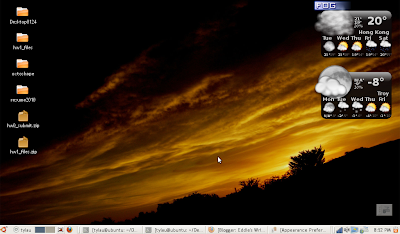
Finally fitting gnome deskop on netbook small screen

Image
Finally I get a nice Gnome layout on my netbook of resolution 1024 x 600 by the use of Trebuchet MS font (require sudo apt-get install msttcorefonts ) size 9 extensively in System -> Preferences -> Appearance -> Fonts (this one still looks nicely even when it is as small as size 9). removing the default panel on the top (by right-clicking on the empty space of the top panel and selecting the appropriate option), putting icons and shortening the date/time display (also by right-clicking on the empty space of the panel to add back, move and customize elements) P.S. To get even better Tahoma fonts used in Microsoft Windows Standard Theme ( ref ), one can do the following: Install Wine In command prompt, type mkdir ~/.fonts Copy the fonts to user .fonts directory: cp /usr/share/wine/fonts/tahoma* ~/.fonts Change the font size to 8

Two ways to connect to VNC server with computer of low resolution

Method 1: On vncserver startup, specify geometry and dpi. Example: vncserver -geometry 980x680 -dpi 80 Method 2: Use ultraVNC which is available free. In option, under the "Scale" section, select a value smaller than 100.

Bottom part of the windows cannot get displayed in Ubuntu netbook

Even after my effort to maximize space for window display, I just find that sometimes the bottom part of the windows, where the confirm and cancel buttons are resided, are hindered from display due to reduced vertical resolution in netbook. After surfing the Internet, I get the following temporary solution: When the mouse is over the window, hold the "Alt" button and drag the windows. Then you can move the window top beyond the top of the screen, and the bottom part can then show up. Source: http://www.linuxforums.org/forum/linux-laptops-netbooks-minibooks/83948-screen-resolution-default-window-resize.html

Customizing Ubuntu for netbook

The default theme used in Ubuntu does not fit well with the rather limited resolution of a netbook. With its 1024x600 resolution, sometimes the bottom part of the window simply cannot show up. No slidebar is available for me, therefore there is no way for me to move down to press the essential confirm button there. So I am investigating ways to get things improved. Below are what I do today. Go to System -> Preferences -> Appearance. Under the Fonts tab, click the Details button. Set the resolution to be 84 dots per inch (dpi). This is by far the smallest dpi setting that still makes the font look pleasant. Under the Theme tab, select Glider. The windows under this theme is by so far I know using minimum height to display title bar and menu bar. This helps to save a little vertical space. You may as well click on the Customize button to work on minor modification of the theme. Right click on the top panel, select "Properties". Under the General tab, lower the size to be...