Posts

Showing posts with the label MAC

Run Windows 10 on Mac using an external SSD/USB drive
Image
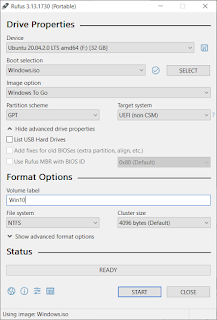
This article shows how you could get a Windows 10 run on Mac using an external SSD/USB drive. I use a Macbook Pro 2020 13 inch to check the procedure. On your Mac, start "Boot Camp Assistant". In the menu bar, Click on "Action" -> "Download Windows Support Software". Have the software downloaded to a storage location for example a USB drive. Shut down your Mac. Use a Windows machine to download Windows 10 ISO at https://www.microsoft.com/en-us/software-download/windows10. Use the Rufus tool available at https://rufus.ie/ to create a Windows 10 USB-to-Go SSD/USD drive.  Once the action is completed, copy the Windows Support Software folder you get in the previous step to root folder of the Windows 10 USB to Go SSD/USD drive. Insert the USB-to-Go SSD/USD drive to your Mac, together with a USB keyboard and a USB mouse. Turn on the Mac with the "Option" key held. Then you could select which drive to boot in. Select the EFI one. Follow the on-scree...

Enable NTFS write on Mac OSX

Open /etc/fstab for writing sudo nano /etc/fstab Add the following line to the file LABEL=NAME none ntfs rw,auto,nobrowse Unmount and attach the NTFS drive. Open the folder where it is mounted. open /Volumes Reference

USB Live Linux on Mac

Create an UEFI Live Linux USB Use Mac Linux USB Loader to turn a FAT32 USB drive to a UEFI Live Linux system. Use the same software, or the steps in this guide to build files for persistence (useful if you want to keep additional driver and software packages and custom settings after reboot). You can only create at most 4GB of persistence storage with the FAT32 USB drive. Get WiFi working To get the wifi driver working, use a thunderbolt to Ethernet adaptor to get the Mac connected to the Internet. Get the following apt packages to get the wifi device working. sudo apt-get install linux-firmware-nonfree b43-fwcutter firmware-b43-installer More information is available in this reference . The reference also contains instruction to install the driver for those who don't have the thunderbolt to Ethernet adaptor. Utilize the remaining space on the USB The remaining space on the UEFI USB Live Linux can't be used unless it is on a partition other than the one that sto...

Convert pidgin conversation log to Adium format (pidgin2adium.py)

Source code download Usage: Obtain a copy of your pidgin conversation log folder (See "Pidgin conversation log location" below on how to locate it on Windows). Also identify the location of the Adium conversation log. Put BeautifulSoup.py (from BeautifulSoup 3 ) and this file in the same folder. Edit the user input parameters section and the Adium specific parameters section if needed. Then run python pidgin2adium.py . You may choose to use options to override the parameters. python pidgin2adium.py --indir INDIR --outdir OUTDIR --username IMACCOUNTUSERNAME --domain IMACCOUNTDOMAIN --service IMSERVICEPROTOCOL   Pidgin conversation log location: For Windows 2000/XP/Vista/7, entering %APPDATA% in your Windows Explorer address bar will take you to the right directory. Windows XP -- C:\Documents and Settings\USERNAME\Application Data . Windows Vista/7 -- C:\Users\USERNAME\AppData\Roaming . Windows 98/ME -- C:\Windows\Profiles\username . The default can be ...